





















Description
exocad Flex Licenses
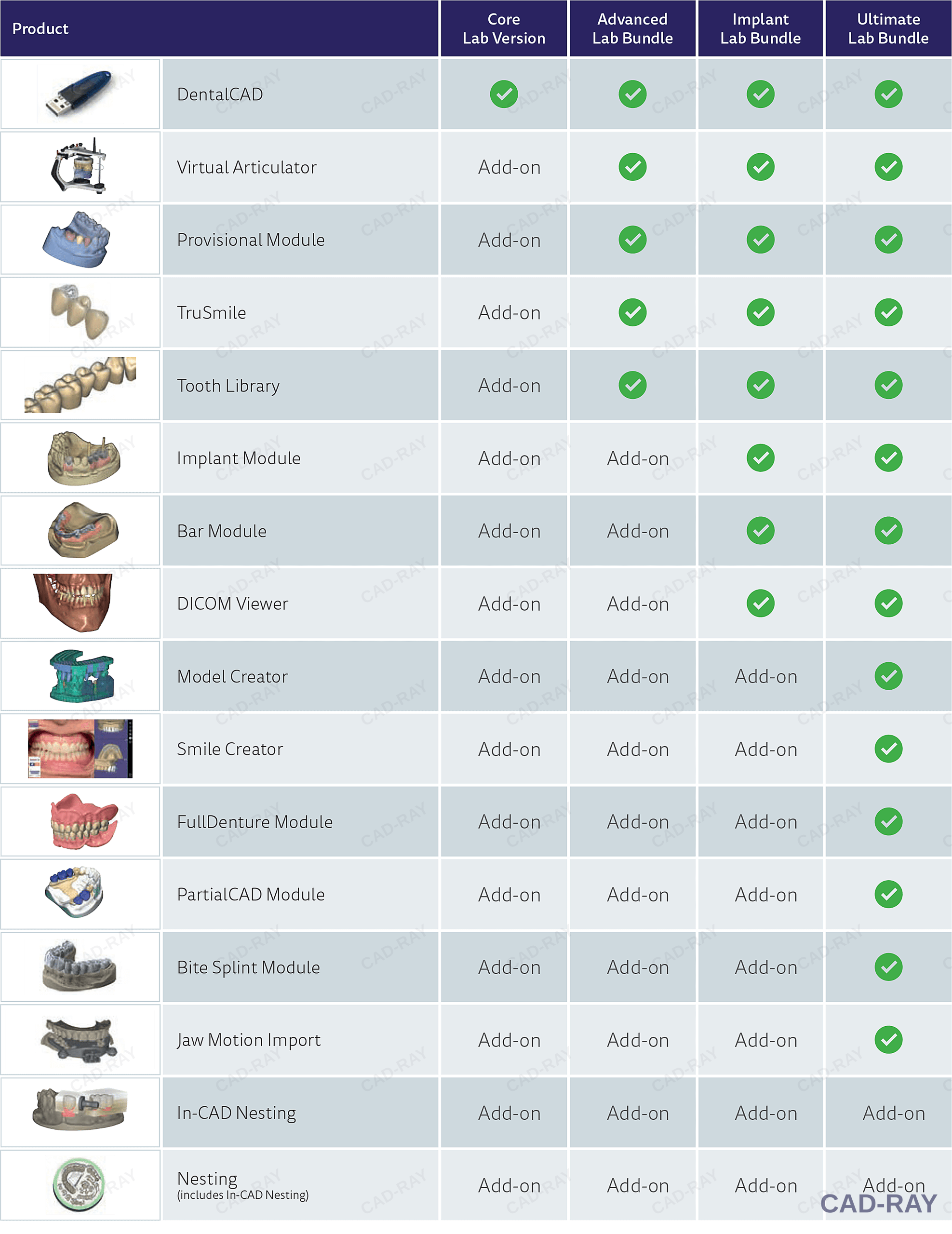
A Flex license sits between a subscription and a perpetual license: you pay a one-time up-front fee, then a required yearly fee to keep the software active and current. Choose your bundle below — the chart shows exactly what each one includes.
Which exocad bundle is right for me?
Every exocad bundle is built on DentalCAD Core. Each step up adds more modules. Pick the bundle that matches the work you plan to do in your office — individual add-on modules can also be purchased later.
DentalCAD Core
Best for: single-unit & bridge restorative
The base exocad DentalCAD design engine for crowns, bridges, copings, inlays/onlays, veneers and wax-ups. Every bundle starts here.
Advanced Bundle
Best for: everyday restorative & temporaries
Core plus the Virtual Articulator, Provisional Module, TruSmile rendering and the ZRS tooth library — the most popular choice for chairside restorative.
Implant Bundle
Best for: implant restorations
Everything in Advanced plus the Implant Module (custom abutments and screw-retained crowns/bridges), Bar Module and DICOM Viewer.
CAD & Print Bundle
Best for: in-office 3D printing
Everything in Advanced plus Model Creator (printable models) and the Bite Splint Module (splints and night guards). Does not include implant modules.
Ultimate Bundle
Best for: doing it all
Every module above — implant, bar, model, splint — plus Smile Creator, Full Denture, PartialCAD and Jaw Motion Import.
exoplan & Guide Creator
Best for: guided implant surgery
Separate from DentalCAD: exoplan implant planning software plus Guide Creator for designing printable surgical guides.
Bundle comparison
| Module | Core | Advanced | Implant | CAD & Print | Ultimate |
|---|---|---|---|---|---|
| DentalCAD Core – crowns, bridges, copings, inlays/onlays, veneers, wax-ups, telescopics | ✓ | ✓ | ✓ | ✓ | ✓ |
| Virtual Articulator | — | ✓ | ✓ | ✓ | ✓ |
| Provisional Module (temporaries) | — | ✓ | ✓ | ✓ | ✓ |
| TruSmile (photorealistic rendering) | — | ✓ | ✓ | ✓ | ✓ |
| ZRS Tooth Library | — | ✓ | ✓ | ✓ | ✓ |
| Implant Module (custom abutments, screw-retained) | — | — | ✓ | — | ✓ |
| Bar Module (implant bars) | — | — | ✓ | — | ✓ |
| DICOM Viewer (CBCT viewing) | — | — | ✓ | — | ✓ |
| Model Creator (printable models) | — | — | — | ✓ | ✓ |
| Bite Splint Module (splints & night guards) | — | — | — | ✓ | ✓ |
| Smile Creator (smile design) | — | — | — | — | ✓ |
| Full Denture Module | — | — | — | — | ✓ |
| PartialCAD (partial frameworks) | — | — | — | — | ✓ |
| Jaw Motion Import | — | — | — | — | ✓ |
Module contents follow exocad’s standard bundle configurations and may change with new software releases. Not sure which bundle fits your workflow? Call CAD-Ray at 833-223-7292 and we’ll help you choose.
How exocad licensing options compare
| License type | Up-front cost | Ongoing cost | If you stop paying |
|---|---|---|---|
| Monthly / Yearly Subscription | Lowest (sign-up fee) | Monthly or yearly payment | Software stops working |
| Flex License | Medium | Required yearly fee | Software stops working |
| Perpetual License | Highest | Optional yearly update contract | Keep using it forever; refresh fee to update later |


Reviews
There are no reviews yet.